Santa Rosa County Case Search allows users to locate public court records, case filings, docket information, hearing schedules, and case status details through available court record systems. A Santa Rosa County Case Lookup can help identify civil, criminal, family, probate, traffic, and small claims cases by using a case number, party name, filing date, or other record information. Many residents, attorneys, researchers, and businesses use a Santa Rosa County Court Search to review legal case records, verify court activity, and track proceedings connected to a specific case. Fast access to court data makes it easier to review case history, filing information, judgments, motions, and other records maintained within the county court system.
Court records often contain important details about legal actions filed in Santa Rosa County. Through an online search, users can review court filings, docket entries, case events, hearing information, party records, and court-related documents available to the public. Search results may vary based on record availability, case type, and court reporting practices. Using accurate search details often improves results and helps locate records more quickly. This page explains the available search methods, record types, and lookup options for finding information within the Santa Rosa County court database while helping users identify the most effective way to search court records.
How to Search Santa Rosa County Court Cases
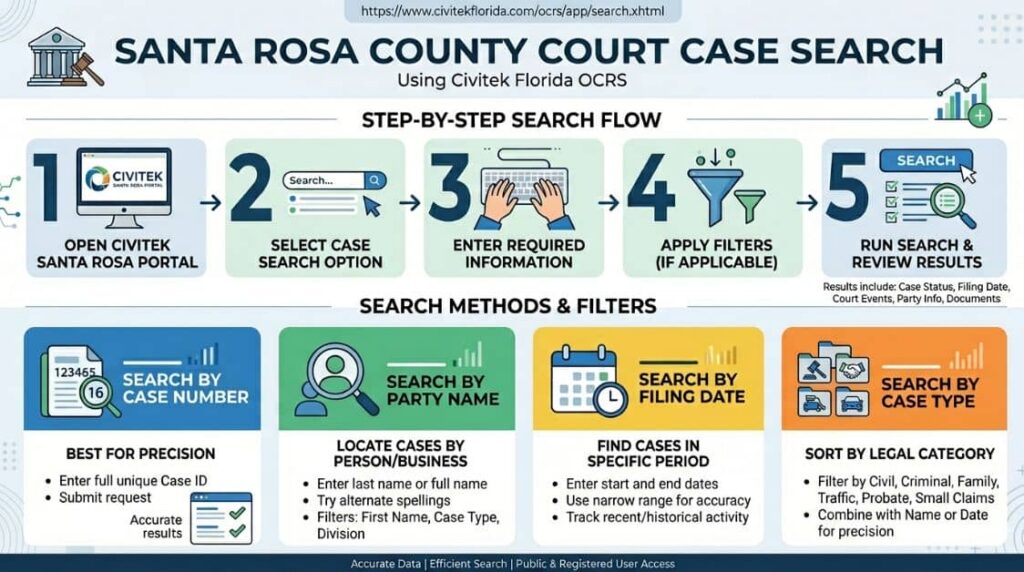
Santa Rosa County Court Search can be completed through the official Civitek Florida Online Court Records System (OCRS). This system allows users to run a case lookup using details like party name, case number, filing date, https://www.civitekflorida.com/ocrs/county/, and case type. Both public and registered users can use the portal depending on record access rules.
Search by Case Number
Case number search is the most precise method for Santa Rosa County Court Cases. Each case has a unique ID, which reduces unrelated results.
Steps:
- Open the Civitek Santa Rosa County portal
- Select the case search option
- Enter full case number
- Submit search request
- Review case details
Search results may include:
- Case status updates
- Filing date
- Court events
- Party information
- Available court documents
This method works best when the full case number is available.
Search by Party Name
Party Name search helps locate cases linked to a person or business in the Santa Rosa County Court Search system. It is commonly used when case numbers are unknown.
Steps:
- Open the Santa Rosa OCRS login:
- https://www.civitekflorida.com/ocrs/county/57/login.xhtml
- Enter the search portal
- Select the Party Name Search option
- Type last name or full name
- Apply filters if available
- Run the search
Search filters may include:
- First name / last name
- Case type (civil, criminal, family, traffic)
- Date range
- Court division
Search by Filing Date
The filing date search helps locate Santa Rosa County Court Cases filed within a specific time period. It is useful for tracking recent or historical court activity.
Steps:
- Open Civitek OCRS system
- Choose the filing date filter
- Enter start and end dates
- Apply search
- Review the results list
This search helps find:
- Recently filed cases
- Time-specific court activity
- Updated court records
- Case progression timelines
Using a narrow date range improves result accuracy.
Search by Case
Case type filtering helps sort Santa Rosa County Court Search results by legal category. This method is helpful when focusing on a specific type of case.
Case types:
- Civil cases (contracts, disputes)
- Criminal cases (felony, misdemeanor)
- Family cases (custody, divorce)
- Traffic cases (citations, violations)
- Probate cases (estate matters)
- Small claims cases
Search flow:
- Open the Civitek portal
- Select case type filter
- Combine with name or date search
- Run search
- Review filtered records
Using multiple filters together improves search precision and reduces irrelevant results.
Santa Rosa County Case Number Search
Santa Rosa County Case Number Search allows searchers to locate court filings and legal case records using a unique case identifier. This method connects directly to official court records tied to a specific docket entry. It often delivers faster results compared to name-based Santa Rosa County case lookup methods. A case number works like a tracking ID inside the court system. It links all related legal case records, including motions, hearing dates, judgments, and filings. Searchers use it in court databases to pull up exact case details without sorting through multiple similar names.
Finding a Case Number
Case numbers usually appear on official court documents tied to a case. These documents include notices, filings, or judgment sheets from the court system. Each number follows a structured format used by Santa Rosa County court filings.
Places to locate a case number:
- Court paperwork received from hearings or filings
- Online court records portals listing docket entries
- Attorney correspondence related to legal case records
- Clerk of court documents issued after case registration
Case numbers often include year codes, division markers, and sequence digits. This structure helps separate civil, criminal, and traffic matters within the system.
Using a Case Number for Faster Searches
A case number reduces the time spent filtering through multiple court records. Searchers enter the number into the Santa Rosa County case lookup system to pull exact case files tied to that identifier.
Benefits of using a case number search:
| Feature | Result for Searchers |
|---|---|
| Direct matching | Pulls exact court filing set |
| Reduced errors | Avoids name duplication issues |
| Full record view | Shows full docket history |
| Faster results | Cuts down search steps |
Court databases use case numbers to organize legal case records across different divisions. This method supports faster review of hearings, motions, and final rulings. It also helps legal researchers and public record seekers confirm case progress without confusion from similar party names.
The Court Dockets and Case Status
A court docket provides a timeline of events in a legal matter. The case status tells you the current stage of the legal proceedings. Reading court filings requires knowing a few legal terms. The docket acts as a ledger. Litigation records update as the case moves forward. The court calendar reflects these updates for the public to see.
What Is a Court Docket?
A court docket is a log of all actions taken in a case. It lists motions, hearings, and rulings in chronological order.
- Lists all filed documents.
- Tracks attorney appearances.
- Records judicial orders.
- Shows timestamps for each action.
Common Case Status Terms
Case status terms describe the current condition of a lawsuit or charge. Terms like “disposed” or “pending” indicate whether the case remains active.
| Status Term | Meaning |
|---|---|
| Pending | The case is still open and active |
| Disposed | The court reached a final decision |
| Dismissed | The court dropped the charges or claims |
| Warrant | An order for arrest has been issued |
The Court Events
Court events include hearings, arraignments, and trials scheduled for a case. These items appear on the court calendar.
- Arraignment: The defendant enters a plea.
- Motion Hearing: Judges rule on specific requests.
- Trial: The final presentation of evidence.
- Sentencing: The judge issues a penalty.
Types of Court Cases Available in Santa Rosa County
Santa Rosa County Court Cases include criminal, civil, family, probate, and traffic matters. The online system categorizes these records for easy retrieval. The local judicial system handles various legal issues. Each category has different rules and procedures. Users can select the specific division during their search. This keeps the database organized and efficient.
| Case Category | Primary Focus |
|---|---|
| Criminal | State charges for law violations |
| Civil | Disputes between private parties |
| Probate | Estates, wills, guardianships |
| Family | Divorce, custody, support |
| Traffic | Moving violations, DUI |
Criminal Cases
Criminal cases involve state charges against a person for breaking the law. These range from misdemeanors to serious felonies.
- Includes theft, assault, and fraud.
- Shows arrest data and sentencing.
- Tracks probation status.
Civil Cases
Civil cases resolve disputes between individuals or businesses. They involve lawsuits over contracts, property, or personal injury.
- Covers small claims and large disputes.
- Displays monetary judgments.
- Shows mediation outcomes.
- Tracks contract disagreements.
Probate Cases
Probate cases deal with wills, estates, and guardianships. The court supervises the distribution of a deceased person’s assets.
- Tracks estate settlements.
- Lists named executors.
- Monitors guardianship assignments.
- Validates official wills.
Family Law Cases
Family law cases handle divorces, child custody, and support issues. These files often have restricted public entry to protect minors.
- Monitors alimony payments.
- Seals sensitive personal data.
- Tracks custody modifications.
- List adoption filings.
Traffic Cases
Traffic cases include moving violations and DUI charges. People can pay fines or contest tickets through these records.
- Includes speeding and reckless driving.
- Shows points applied to licenses.
- Tracks fine payments.
- Lists DUI sentencing requirements.
Using Online Court Case Search
Online search tools let the public find judicial records from home. A Court Case Search saves a trip to the physical courthouse. The court database provides digital public entry around the clock. Users can perform searches at any time. The system delivers fast results.
Benefits of Online Searches
Online searches offer convenience and speed for finding records. Users avoid waiting in lines at the clerk’s office.
- Available 24 hours a day.
- Instant results on screen.
- Free to use for basic lookups.
- Saves travel time and gas.
Search Tool Features
Search tools include filters, document viewers, and print options. The searchable database makes finding specific details simple.
- Advanced filtering options.
- Secure payment for official copies.
- Date range selectors.
- Document download capabilities.
Court Calendar and Hearing
The court calendar lists upcoming hearings and trials for local cases. Users check this schedule to find exact dates and times for court events. Knowing when to appear in court prevents missed dates. The court schedule updates regularly to reflect changes.
Finding Hearing Dates
You can find hearing dates by searching your case number online. The results page displays the next scheduled court appearance.
- Look under the “Events” tab in your case.
- Verify the time and courtroom number.
- Check for last-minute cancellations.
- Note the assigned judge for the hearing.
Reviewing Upcoming Court Events
The portal allows users to view a daily schedule of court events. This helps attorneys and plaintiffs track multiple cases.
- View daily dockets.
- See which judge is assigned.
- Confirm case resolution dates.
- Track multiple cases simultaneously.
Common Issues When Searching Court Cases
People often face search errors during a case lookup due to typos or missing information. These issues prevent the system from finding the correct court records. Locating files online sometimes presents challenges. Simple mistakes can block search results. Double-checking your input solves most problems.
Incorrect Case Numbers
Typing the wrong case number yields zero results. Users must verify the exact letter and number sequence from their paperwork.
- Check for transposed numbers.
- Ensure the year prefix matches.
- Omit spaces or dashes if the system requires it.
Name Variations
Name variations cause missed results if the system spells a name differently. Searchers should try multiple spellings or partial names.
- Use “Robert” instead of “Bob.”
- Search by last name only if the first name is uncertain.
- Include hyphens for double names.
Record Availability Limitations
Some records remain sealed or expunged from public view. The system will not display confidential or deleted files.
| Problem | Solution |
|---|---|
| No results found | Check spelling and case number format |
| Missing documents | The file might be sealed or archived |
| Old case missing | Contact the archives division for historic files |
Frequently Asked Questions
Finding court records can raise questions about search methods, available information, and access rules. The following answers explain common topics related to Santa Rosa County Case Search, Santa Rosa County Case Lookup, and court record access. These FAQs help users understand how to locate case details, review court dockets, and find hearing information through available court resources.
How do I search Santa Rosa County court cases?
People can search Santa Rosa County court cases by visiting the official Santa Rosa County Case Search portal. Users need to enter a party name or a case number into the searchable database. The system will then display a list of matching judicial records. You can narrow down the results by adding a filing date or case type. This process lets residents find court documents without visiting the courthouse in person.
Can I search cases by name?
Yes, citizens can perform a Santa Rosa County Case Lookup using a person’s name. The search tool requires the last name and first name to generate accurate results. Typing a middle initial helps filter out common names. The database will show all active and closed files linked to that specific person. Users should check different spelling variations if they do not see the expected results.
How do I find a case number?
A case number appears on official court documents, legal notices, or letters from an attorney. People who cannot find their paperwork can use the online Santa Rosa County Case Search by name to locate the number. The results page lists the unique alphanumeric identifier next to the party name. Anyone can call the clerk’s office to request this number. Providing a date of birth helps the clerk find the exact file.
What information appears in case results?
Case results display party names, charges, filing dates, and the current case status. Users will see a list of court events and docket entries. The Santa Rosa County Court Search reveals the assigned judge and the specific courtroom. Some files include scanned images of the actual court documents. Sensitive information stays hidden to protect privacy.
Are court records public?
Most judicial records remain open to the public under state law. The Santa Rosa County Case Lookup allows citizens to view civil, criminal, and traffic files. In certain cases, like adoptions or juvenile matters, the records stay sealed from public view. The court database restricts entry to these confidential files. Anyone can view standard public records without special permission.
How often is case information updated?
The court database updates multiple times throughout the business day. Clerks enter new court filings and case events as they happen. The Santa Rosa County Case Search reflects these changes almost immediately. Delays might occur during holidays or weekends. Users should refresh their browser if they do not see recent updates.